
Medscape Case Study
Medscape Education is the leading online resource for physicians and healthcare professionals (HCPs) worldwide, offering Continuing Medical Education (CME), breaking medical news, and expert perspectives, along with essential drug and disease information
The organization’s mission is to support HCPs in improving patient care, with access to reliable, accurate and cutting-edge content. Medscape Education offers comprehensive and extensive resources for physicians, including free CME across 30+ different specialties. Its digital community enables physicians to share cases, ask questions and discuss best practices in real time.
The challenge
Founded in 1995, Medscape Education is a recognised and trusted medical education provider, the largest of its kind. With hundreds of staff across the globe, an organized approach to reference management and research discovery is essential given the volume of literature its teams access every day.
Between Medscape Education’s Editorial Coordinators, Content Production Editors, and Medical Copy Editors, each individual must be able to effectively collect and curate research materials in order to do their job. Similarly, Medscape Education’s Medical Education Directors must gather relevant journals and references to develop the organization’s CME programmes.
Previously, documents were scattered across individual employees’ computers, often with multiple downloads of the same document. This poor document management was hindering Medscape Education’s productivity, costing the business both time and money.
For Stephanie Annesi, Manager on the Editorial Services team for Medscape Education, integrating a central content management system was the clear solution.
“The team were saving all their references on their own drives or on SharePoint. It was taking up so much space and we often found ourselves reusing the same articles, saving them in different places. We already had ReadCube, but we hadn’t really used it properly. So in 2018, we decided to unify all of our literature, building one curated library of research through ReadCube.”
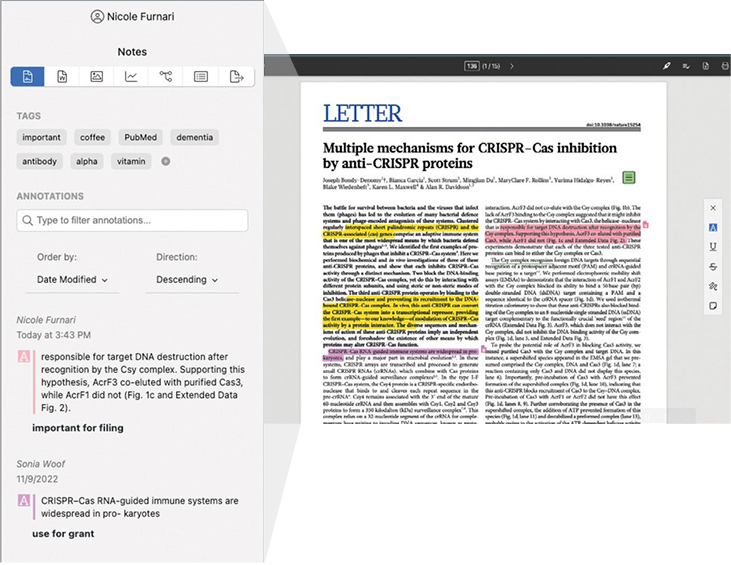
Being able to annotate in a PDF or highlight key points in a paper makes it much easier for our teams to analyze and factcheck content, and access the figures they need. Working with annotated papers and being able to search them saves us an incredible amount of time.
Increased productivity with enhanced content management workflows
Medscape Education incorporated ReadCube into their team’s workflow to seamlessly create a centralized library with thousands of references. The next step was to ensure everyone could easily access the articles they needed.
The SmartList feature, which automatically categorizes articles the moment they’re downloaded, helps the team stay organized and avoid a cluttered library. Tagging, which is one of Medscape Education’s most-used features, adds an extra level of coordination, making the search process even easier for everyone.
“Using tags in ReadCube has been transformative to our workflow. It makes it so easy. Our Medical Education Directors can simply share the link to a tag which has all of the references for an upcoming programme”, says Stephanie. “The tags are instrumental, especially considering the size of our library. It feels almost effortless, especially as we were doing everything manually before.”
Making sense of unlimited information
Most of Medscape Education’s Medical Education Directors access research through PubMed® and Google Scholar. They need to avoid duplicating papers, especially any behind a paywall, which could lead to internal confusion and organizational funds being wasted. ReadCube’s Google Chrome Extension recognizes if a paper is already in Medscape Education’s shared library, where it can be accessed instantly. Meanwhile, new paper additions can be saved directly to the reference collection.
Stephanie describes the plug-in as “a game changer.” “I still get emails all the time from colleagues telling me how helpful it is. It’s amazing to see at a glance what we already have, what we can quickly download and identify what might be free.” It has also helped the team overcome data overload: “With the amount of references we have in our library, it’s not uncommon for people to feel overwhelmed with information. The Google Chrome extension lets us see exactly when references were added or modified. I tell my colleagues to sort them by the date they were added, similar to how they read their emails, which makes everything much clearer.”
Building a culture of collaboration
Medscape Education represents a widely trusted source of medical information. As such, its editorial and education teams are responsible for finding vast amounts of clinically relevant research information and delivering the highest quality continuing education for HCPs available. With virtual teams communicating across multiple time zones, everyone needs the right tools to work cohesively and stay updated on shared projects.
ReadCube enables effortless sharing of references, PDFs and annotations between Medscape Education employees. “Being able to annotate in a PDF or highlight key points in a paper makes it much easier for our teams to analyze and factcheck content, and access the figures they need,” explains Stephanie. “Working with annotated papers and being able to search them saves us an incredible amount of time.”
ReadCube’s on-demand support also aids internal collaboration: “I’m in direct contact with my account manager, who’s always on hand to answer questions from the team. We’re also big fans of ReadCube’s support pages and have used the FAQs and videos to improve our workflows, particularly when it comes to the advanced search function.”
Continuous improvement, now and in the future
The depth and breadth of content is a major attraction, with millions of physicians and HCPs accessing Medscape Education content and CME on a near-daily basis. Stephanie continues to be excited about the potential to unlock even greater efficiencies through library management and referencing.
“We’re six years down the line with ReadCube, and there’s still so much more to explore. We’re excited to potentially build our Medscape Education citation style as an option in ReadCube, especially for our text programmes. We’re always thinking about new ways to use ReadCube and look forward to seeing what more we can do with the tool in years to come.”
Build custom review workflows
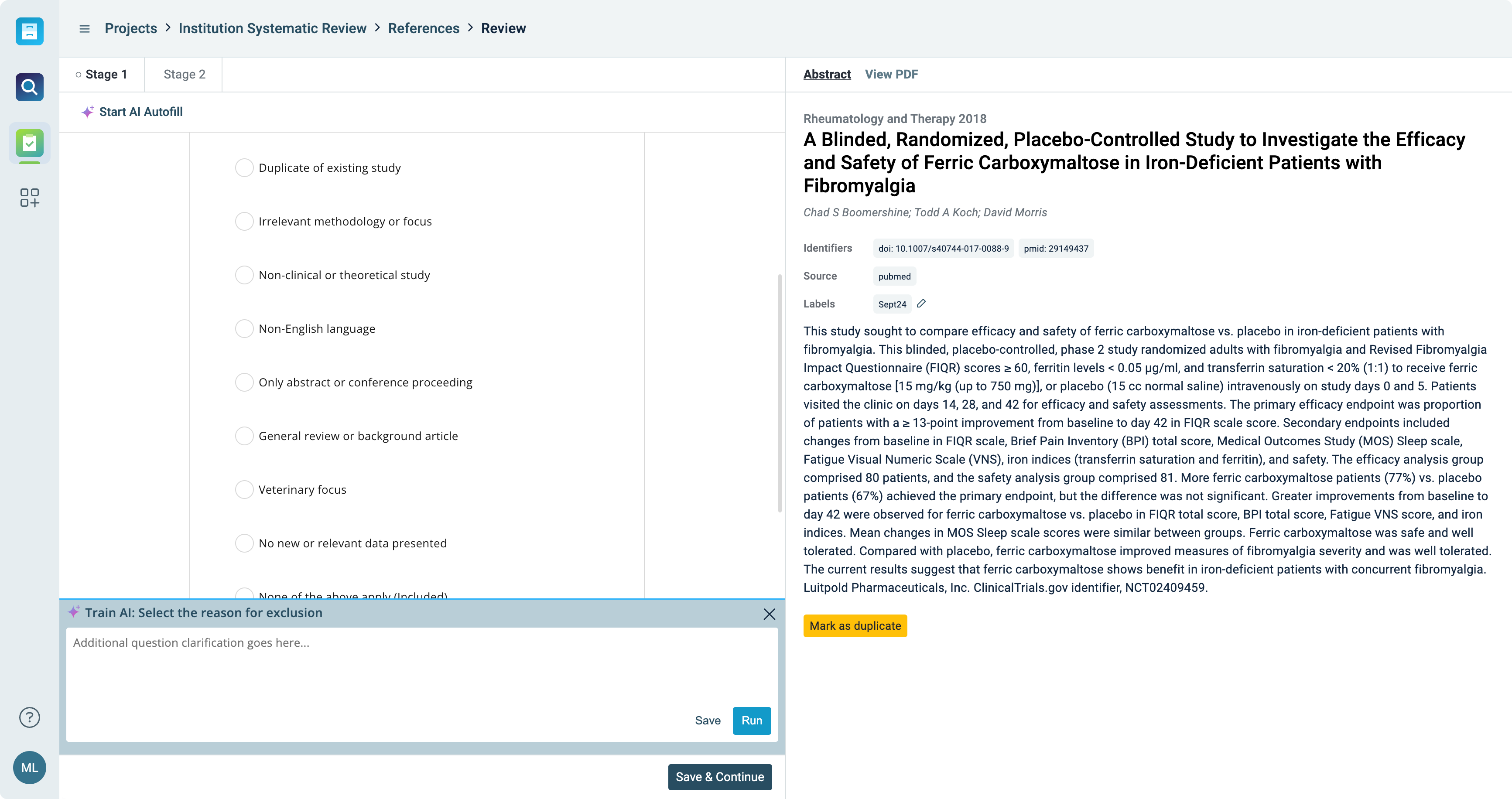
- Implement multi-level screening for an in-depth literature review and screening
- Streamline the review process with your predefined inclusion and exclusion criteria
- Easily identify, manage, and review any conflicts in data entries when working with multiple reviewers, ensuring alignment and consistency
- Seamlessly integrate data from past reviews, ensuring continuity and time-saving efficiency
Depending on your department, industry, and goals, literature reviews vary greatly. ReadCube’s flexible and customizable Literature Review makes it simple for you to design the review that makes the most sense for your team.
Ask the right questions
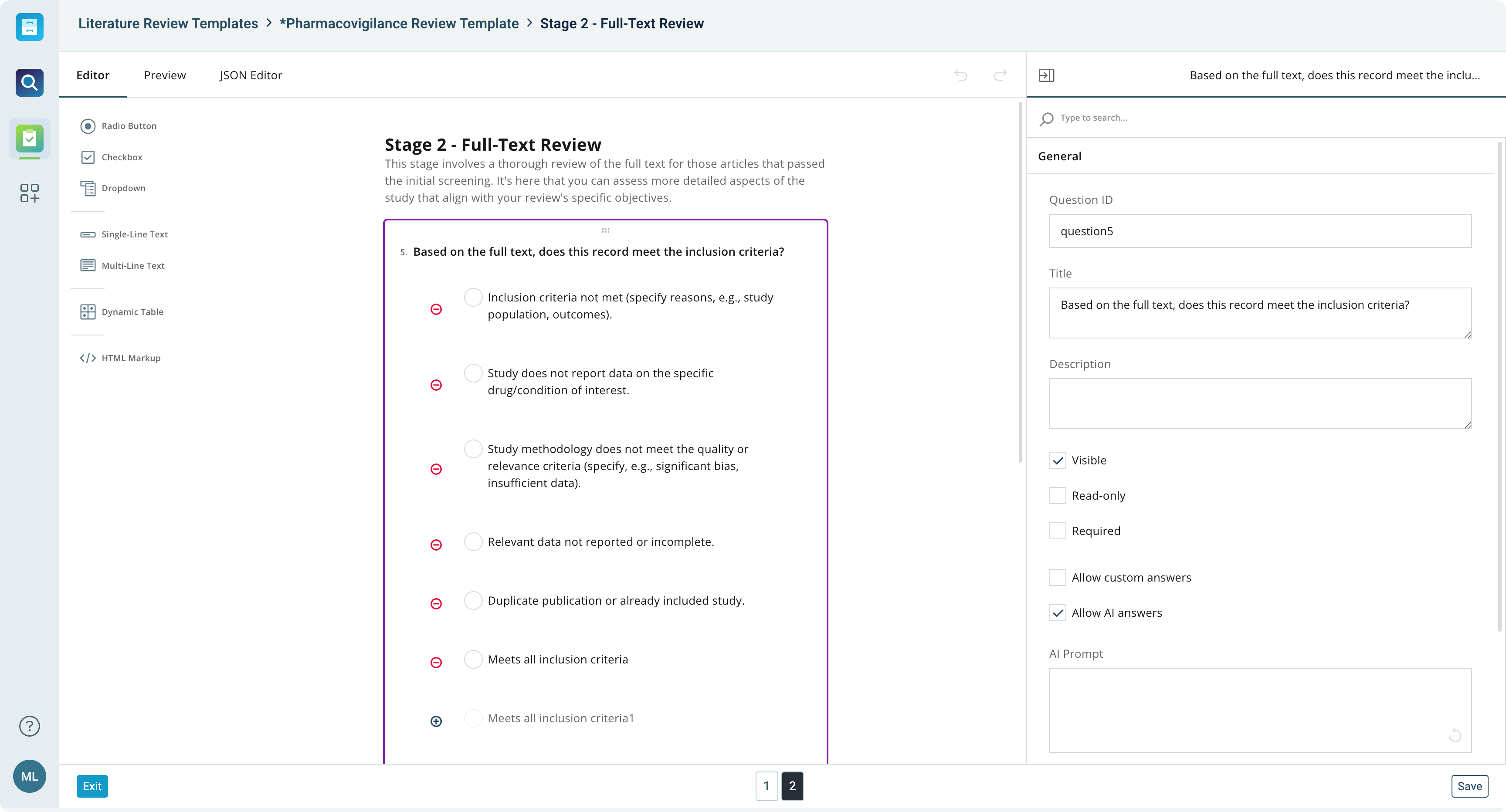
- Design and manage systematic review forms and questions with ease
- Add specific search results automatically to your review workflow
- Create subforms, select specific fields, implement conditional hidden fields, and manage shared fields
- Build advanced, calculated fields for enhanced accuracy in data assessment
Design the literature review workflow that actually works for your team with advanced and flexible form builder options.
AI-enhanced review and analysis
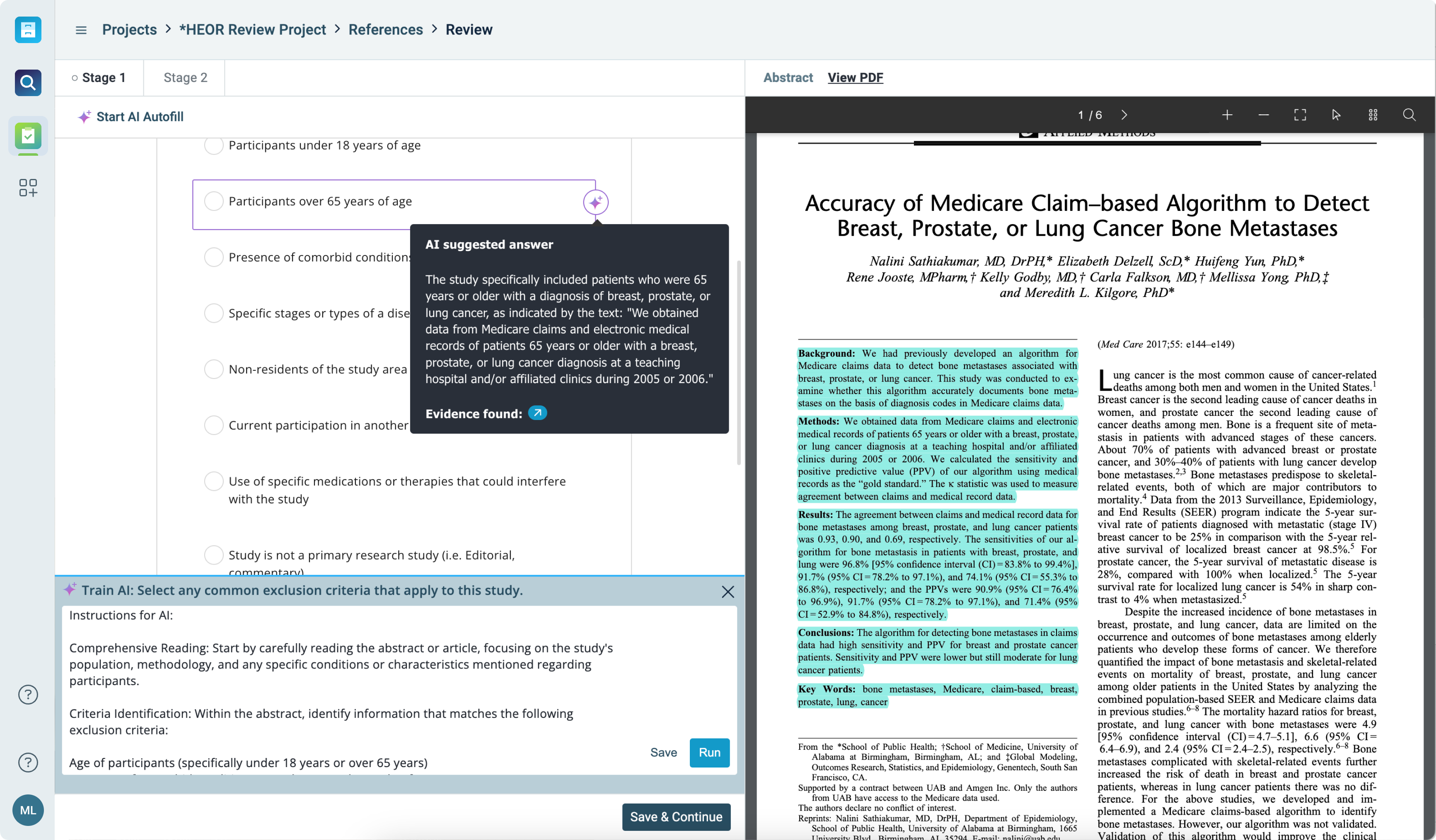
- Make data-driven decisions faster with actionable AI insights that simplify complex reviews
- Automatically generate summaries, extract key data points, and create visual representations to support your analysis
- Leverage machine learning to identify patterns, gaps, and key insights across your literature set
Systematic reviews are faster, more organized, and enhanced by AI, allowing you to focus on generating insights, not managing paperwork.
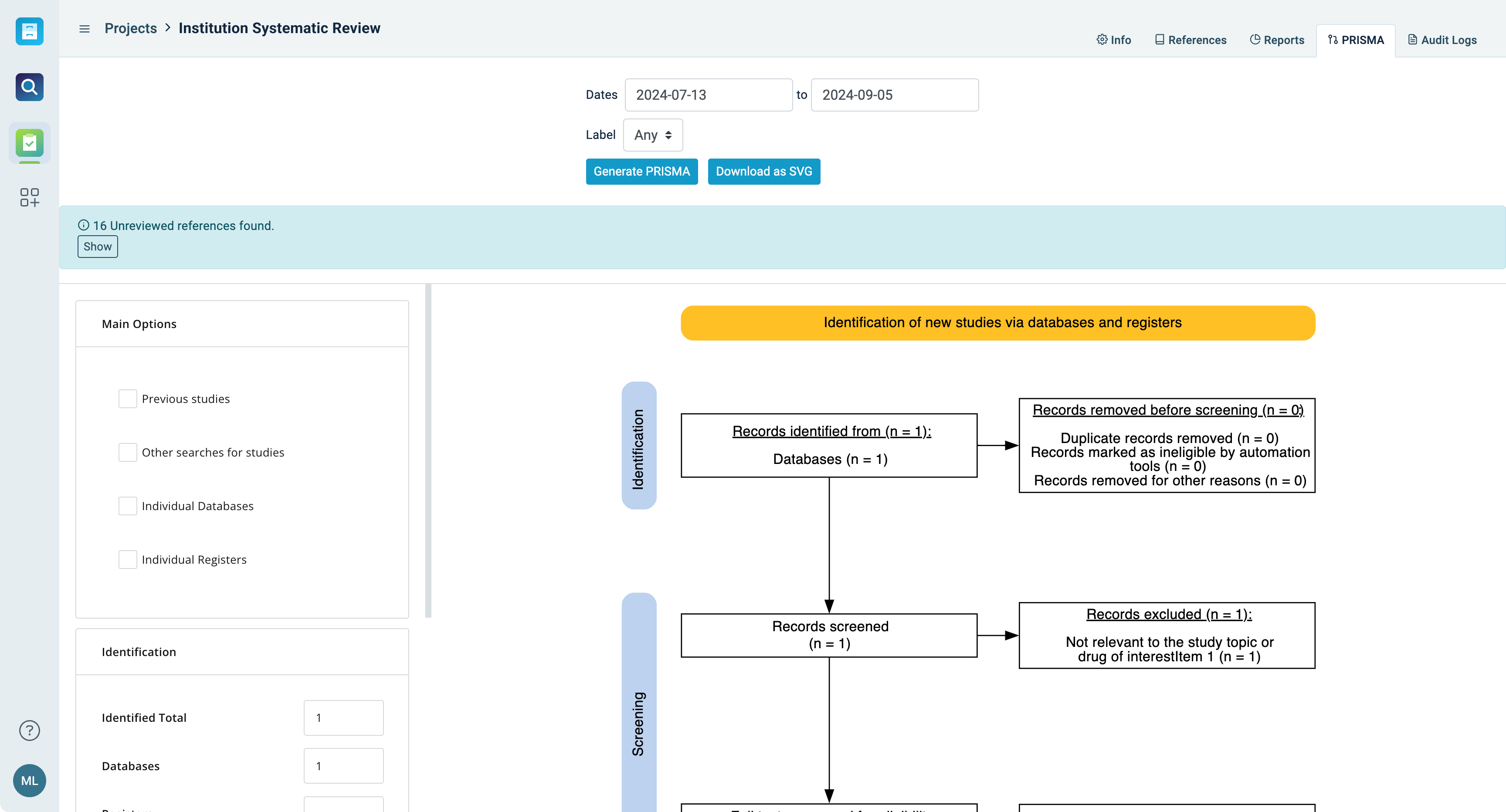
Share your findings
- Utilize PRISMA for structured reporting and visualization, providing detailed flow diagrams in editable formats
- Customize exports for reporting - including citation metadata, form data, and custom metadata fields
- Maintain a detailed audit log of all imports, changes, and identified conflicts, ensuring transparency and traceability
What’s the point of a review if it’s difficult to share results? Simplified and automatic reporting make it easy to share what you’ve learned - so your organization can make better evidence-based decisions.
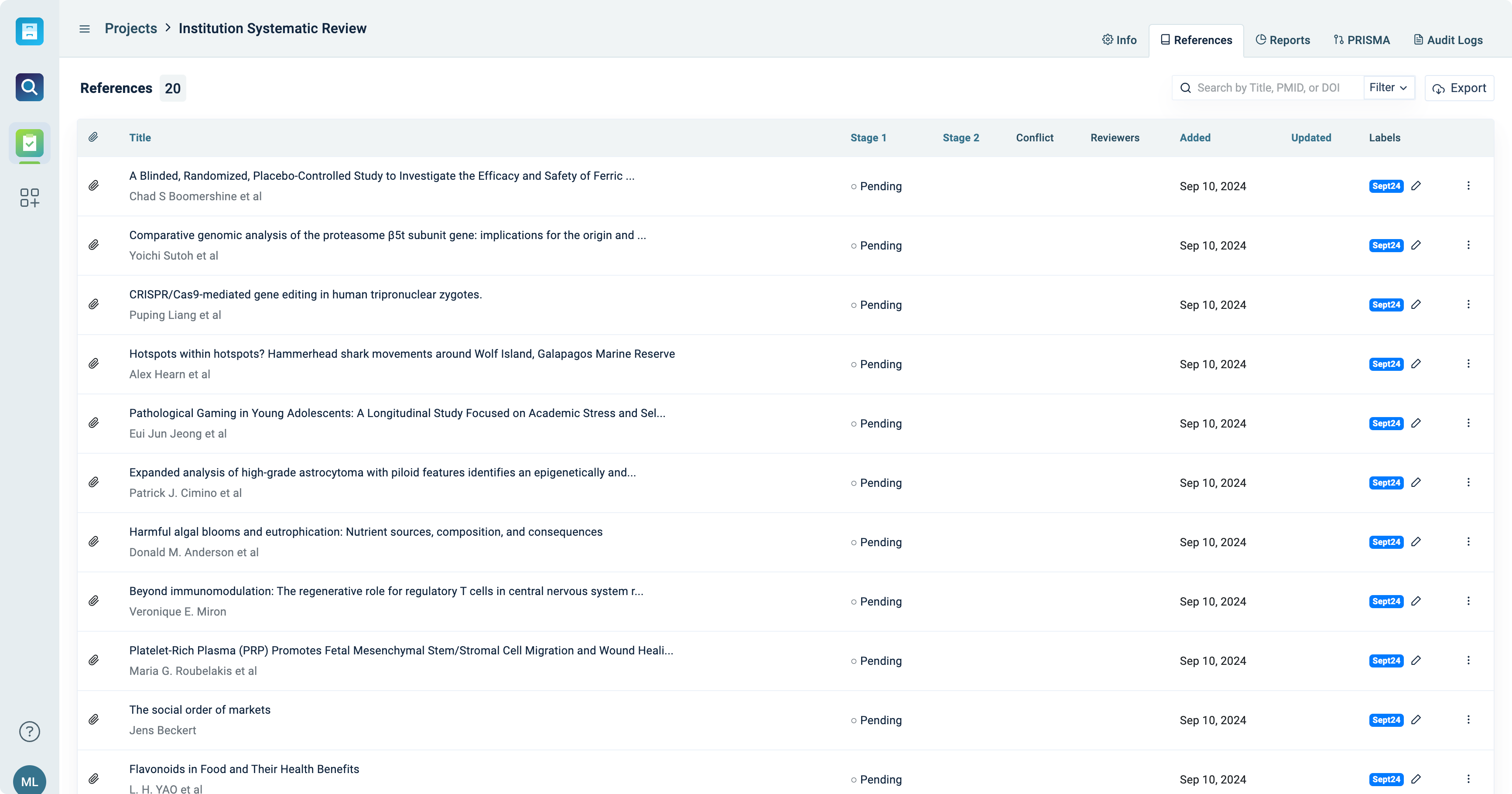
Manage your reviews.
- Seamlessly import data using common file types such as RIS, CSV, and nBib from third party databases
- Automatically flag duplicates upon import or manually flag duplicates as part of your review
- Admin dashboards show an overarching view of all projects, with the ability to assign form templates, construct new form templates, delegate reviewers to specific projects, and manage the status of ongoing projects
- Reviewer dashboards show only the projects and citations relevant to a reviewer’s role. Understand current project status, pinpoint potential conflicts, and seamlessly access reporting features for exclusion, inclusion, and PRISMA
Ensure your team is on track and making progress with advanced governance features.